Hi!! Today I’m writting a blog on Unix.
UNIX developed in 1970s at the Bell Labs research center by Ken Thompson, Dennis Ritchie and Rudd Conaday.
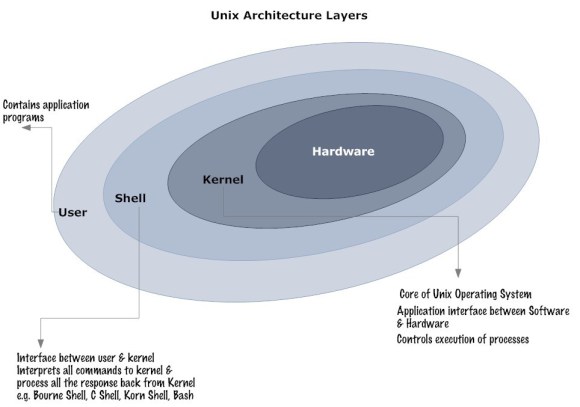
Kernel:
- Core of operating system
- Control the hardware of computer system
- Every UNIX system has a kernel that gets automatically loaded into memory when system is booted
Types of kernel:
Monolithic kernel :
Earlier architecture of monolithic kernel consist of:
>Huge kernel size
>Poor maintainablity
>Addition of new features results in recompilations of whole kernel which can be time consuming.
Modern consist of:
>Different modules which can be dynamically loaded and unloaded.
>Good maintainablity and easily extensible.
Micro kernel :
>control growing size of kernel code by reducing its size.
>increasing the security and stabilty of operarting system.
Modular or Hybrid kernel:
>combine the speed and simpler design of monolithic kernel with the modularity & execution safety of a micro kernel
Shell
Its a command interpreter that translate the command of user in language of kernel and get executed.
User interact with shell through command interface.
Type:
Bash shell – the Bourne again shell was developed by GNU project .It is based on B shell language and has features of C and K shells.
B shell – /bin/sh is the default Unix shell for many Unix operating systems .
C shell – /bin/csh was designed to provide the interactive features lacking in b shell such as job control and aliasing .
K shell – /bin/ksh was created by David Korn and has features of both B shell and C shell along with some additional features .
Bourne shell – was written by S. R. Bourne and its more emphasis is to use it as a scripting language rather than an interactive shell .
Example: [shubhala@myserver]$ls
username-shubhala
machine name- myserver
$-shell prompt sign, waits for input from user.
Basic commands of UNIX
ls – lists files in current directory.
cat – reads one or more files and prints their contents to standard output.
cd – change directory to given directory name.
cd.. – move back one directory.
chmod – change file permission.
file – determine the file type
head – display first top ten lines of a file
tail – display ten bottom lines of a file
cal – print the calender of a default month
ltr – show the current file in the bottom
stty – use to change and print the terminal line settings
stty-a – list current settings
uname(Unix name) – print the name, version, and other details about the current machine and operating system on it.
lpr – send file to printer.
mkdir – make a directory called graphics.
rm – remove one or more files.
rmdir – remove directory.
rm-rf -remove a directory forcefully
touch – create a blank file
who – lists whi is logged on your machine.
pwd – check your current directory
passwd – change password
cp – copy file into directory.
grep – find which files contain a certain word.
eg: $grep “good words”
history – lists commands you have done recently.
ps – lists all running process by #ID
eg: $ps aux
kill – kill process with ID#8453
eg: $kill-9 8453
Permission in a file or directory:
Number Octal Permision representation(Reference)
0 No permission(- – -)
1 Execute( – – x)
2 Write(- w -)
3 Execute + Write(- w x)
4 Read(r – -)
5 Read + Execute(r – x)
6 Read + Write(r w -)
7 All permission(r w x)
Example: Give 744 permission on a file and a directory names unix and sem respectively:
-rwxr- -r- – unix (file)
-drwxr- -r- – sem (directory)
Thanks!!
 Shubhala's Blog